
A secure, database-free content management system built with PHP. Zero dependencies, maximum simplicity.


xsukax is a lightweight flat-file CMS that eliminates database overhead while maintaining full CMS functionality. Content is stored in plain .xfc files with embedded metadata, making it portable, version-control friendly, and simple to backup.
Core Features:
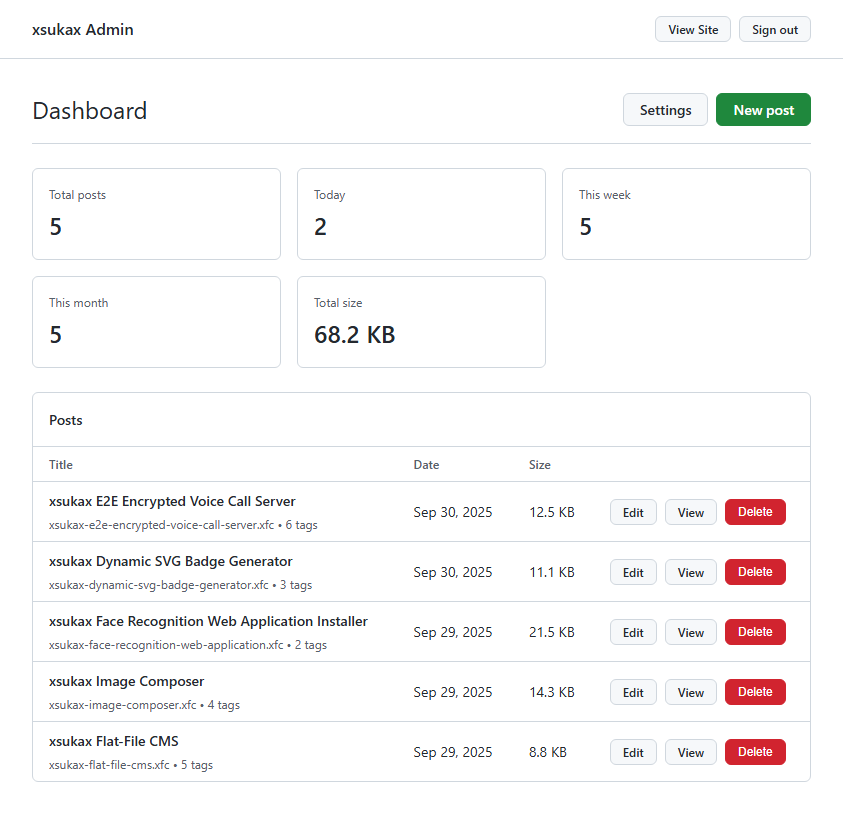
- Admin dashboard with analytics and WYSIWYG editor (Quill.js)
- Full-text search across posts
- Five professional themes (GitHub, Terminal, IMDb, Bluey, Dark-Grey)
- Automatic RSS feed and sitemap generation
- Tag-based organization with random discovery
- Responsive design across all themes
Authentication:
- Bcrypt password hashing with
PASSWORD_DEFAULT - Session regeneration on login
- CSRF protection on all state-changing operations
- Configurable minimum 6-character password
Input Protection:
- Path traversal prevention via realpath validation
- Comprehensive slug sanitization
- HTML escaping on all output
- Safe file operations with exclusive locks
File Security:
- Restrictive permissions (0664 posts, 0600 config)
- Atomic writes with
LOCK_EX - No dynamic code execution
Attack Surface:
- Zero SQL injection vectors (no database)
- Minimal external dependencies (CDN only)
- Error display disabled by default
- No analytics or tracking
- No external API calls (except CDN fonts)
- Local-only data storage
- Human-readable file format
- Minimal cookie usage (session + theme)
- Rich WYSIWYG editor with formatting, images, code blocks
- Tag system with bulk operations
- Creation date preservation
- Draft preview before publishing
- Configurable pagination (default: 12 posts/page)
- Real-time search with result highlighting
- Dynamic tag filtering (20 random tags displayed)
- One-click code copying
- Instant theme switching
- Dashboard analytics: Total, Today, Last 7 Days, Last 30 Days
- Settings management: URL, name, description, posts per page
- Post management: Paginated listing with inline actions
- Password management through UI
- Portable: Copy files to migrate
- Version-control friendly: Plain text storage
- Simple backups: No database dumps
- Extensible: Easy theme creation
- Debuggable: Readable file format
- PHP 7.4+
- Apache/Nginx
- Standard PHP extensions (no extras)
1. Clone Repository
git clone https://github.com/xsukax/xsukax-Flat-File-CMS.git
cd xsukax-Flat-File-CMS
2. Configure Server
Apache (.htaccess)
RewriteEngine On
RewriteCond %{REQUEST_FILENAME} !-f
RewriteCond %{REQUEST_FILENAME} !-d
RewriteRule ^(.*)$ index.php [QSA,L]
Nginx
location / {
    try_files $uri $uri/ /index.php?$query_string;
}
3. Set Permissions
chmod 755 . Posts/ themes/
chmod 644 *.php
4. Initial Login
- Navigate to
https://yourdomain.com/admin.php - Default password:
admin123 - Change immediately in Settings → Change Password
5. Configure Site
- Settings → Update Site URL, Name, Description
- Save configuration
xsukax-Flat-File-CMS/
├── admin.php              # Admin panel
├── index.php              # Front-end
├── Posts/                 # Post storage (auto-created)
├── themes/                # Theme templates
│   ├── github.php
│   ├── terminal.php
│   ├── imdb.php
│   ├── bluey.php
│   └── dark-grey.php
└── ../config.php          # Config + admin hash (auto-created)
graph TD
    A[HTTP Request] --> B{Route}
    B -->|/admin.php| C[Admin Panel]
    B -->|/| D[Front-end]
    B -->|/rss.xml| E[RSS Feed]
    B -->|/sitemap.xml| F[Sitemap]

    C --> G{Auth?}
    G -->|No| H[Login]
    G -->|Yes| I[Dashboard]
    I --> J[CRUD Operations]
    J --> K[Posts Directory]

    D --> L[Theme Engine]
    L --> M[Render Content]
    M --> K

    E --> K
    F --> K

    K --> N[.xfc Files]
sequenceDiagram
    participant U as User
    participant A as Admin
    participant F as Filesystem
    participant C as Config

    U->>A: Login
    A->>C: Verify hash
    A->>U: Dashboard

    U->>A: Create post
    A->>A: Sanitize input
    A->>F: Write .xfc
    F->>A: Confirm
    A->>U: Success

    U->>A: Update settings
    A->>C: Save config
    C->>A: Confirm
    A->>U: Success
- Admin Panel: Login at
/admin.php - New Post: Click "New post"
- Title: Enter title (auto-generates slug)
- Tags: Select existing or add new (comma-separated)
- Content: Use WYSIWYG editor
- Save: Creates
.xfcfile inPosts/
Via Settings Panel:
- Site URL: Full URL with protocol
- Site Name: Appears in headers
- Site Description: SEO meta description
- Posts Per Page: 1-100 (default: 12)
Password Change:
- Current password required
- Minimum 6 characters
- Confirmation match required
<!--META
tags: php, cms, tutorial
created: 1696118400
META-->
<h1>Post Title</h1>
<p>Content here...</p>Themes access these variables:
$is_home       // Boolean: homepage check
$posts         // Array: paginated posts
$content       // String: rendered HTML
$allTags       // Array: unique tags (shuffled)
$search        // String: search query
$page          // Integer: current page
$totalPages    // Integer: pagination
Minimal Theme Template:
<!DOCTYPE html>
<html>
<head>
    <title><?=htmlspecialchars($pageTitle)?></title>
</head>
<body>
    <?php if($is_home): ?>
        <!-- Post listing -->
    <?php else: ?>
        <!-- Single post -->
    <?php endif; ?>
</body>
</html>Front-end: ?s=query
With filters: ?s=query&tag=tagname&page=2
Searches titles and full content (case-insensitive)
Manual:
tar -czf backup-$(date +%Y%m%d).tar.gz Posts/ ../config.phpAutomated (Cron):
0 2 * * * cd /path && tar -czf backups/$(date +\%Y\%m\%d).tar.gz Posts/ ../config.php| Issue | Solution |
|---|---|
| 404 on admin | Check file permissions (644) |
| Can't save posts | Verify Posts/ writable (755) |
| Config not saving | Parent directory must be writable |
| Lost password | Delete config.php, resets to admin123 |
| Themes not loading | Ensure themes/*.php exist |
- Change default password
- Set config.php to 0600 permissions
- Enable HTTPS
- Add security headers (CSP, X-Frame-Options)
- Regular PHP updates
- Implement rate limiting
- Monitor Posts/ directory
Apache (.htaccess)
<FilesMatch "^config\.php$">
    Require all denied
</FilesMatch>

Header set X-Content-Type-Options "nosniff"
Header set X-Frame-Options "SAMEORIGIN"
Header set X-XSS-Protection "1; mode=block"
Nginx
location ~ ^/config\.php$ {
    deny all;
    return 404;
}

add_header X-Content-Type-Options "nosniff";
add_header X-Frame-Options "SAMEORIGIN";
add_header X-XSS-Protection "1; mode=block";- Fork repository
- Create feature branch
- Follow PSR-12 standards
- Test on PHP 7.4, 8.0, 8.1, 8.2
- Submit pull request
Licensed under GNU General Public License v3.0
Permissions:
- Commercial use
- Modification
- Distribution
- Private use
Conditions:
- Disclose source
- License and copyright notice
- State changes
- Same license
See LICENSE or https://www.gnu.org/licenses/gpl-3.0.html
- Issues: GitHub Issues
Built for security, simplicity, and speed.