OBJECT RELATIONAL MAPPERS (
An object-relational mapper (ORM) is a code library that automates the transfer of data stored in relational database tables into objects that are more commonly used in application code.
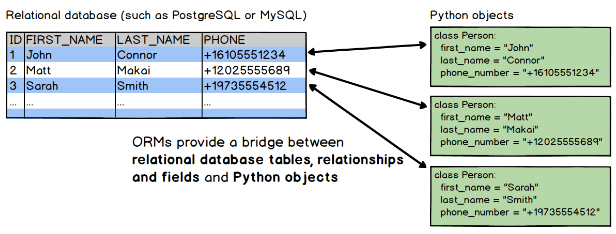
ORMs provide a high-level abstraction upon a relational database that allows a developer to write Python code instead of SQL to create, read, update and delete data and schemas in their database. Developers can use the programming language they are comfortable with to work with a database instead of writing SQL statements or stored procedures.
Example:
SQL:
SELECT * FROM USERS WHERE zip_code=94107;Django ORM:
# obtain everyone in the 94107 zip code and assign to users variable
users = Users.objects.filter(zip_code=94107)
The ability to write Python code instead of SQL can speed up web application development, especially at the beginning of a project.
ORMs also make it theoretically possible to switch an application between various relational databases. For example, a developer could use SQLite for local development and MySQL in production. A production application could be switched from MySQL to PostgreSQL with minimal code modifications.
In practice however, it's best to use the same database for local development as is used in production. Otherwise unexpected errors could hit in production that were not seen in a local development environment. Also, it's rare that a project would switch from one database in production to another one unless there was a pressing reason.
Python ORM libraries are not required for accessing relational databases. In fact, the low-level access is typically provided by another library called a database connector, such as psycopg (for PostgreSQL) or MySQL-python (for MySQL)
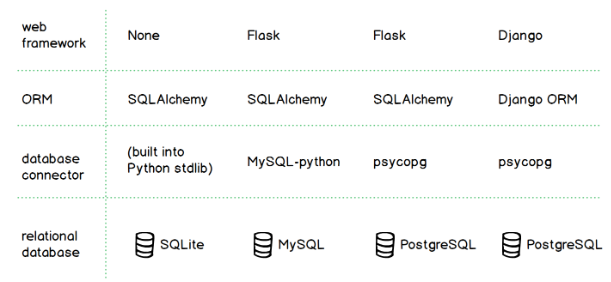
Developers can also use ORMs without a web framework, such as when creating a data analysis tool or a batch script without a user interface.
- Impedance mismatch: the difficulties that occur when moving data between relational tables and application objects. The gist is that the way a developer uses objects is different from how data is stored and joined in relational tables.
- Potential for reduced performance: With ORMs, the performance hit comes from the translation of application code into a corresponding SQL statement which may not be tuned properly.
- Shifting complexity from the database into the app code:
There are numerous ORM implementations written in Python, including:
- SQLAlchemy
- Peewee
- The Django ORM
- PonyORM
- SQLObject
- Tortoise ORM ([source code] (https://github.com/tortoise/tortoise-orm/))
MySQLdb is a Python module that allows Python programs to interface with MySQL databases. It is a third-party library that provides a Python interface to MySQL, which is a popular open-source relational database management system. MySQLdb supports a wide range of MySQL functionality, including transactions, stored procedures, and advanced data types.
To use MySQLdb in your Python project, you first need to install it. You can install it using pip, the Python package manager, with the following command:
pip install mysqlclientOnce installed, you can use MySQLdb to connect to a MySQL database using the connect() method, which takes a number of parameters including the host, user, password, and database name. For example, to connect to a local MySQL database with a user root and password password, you can use the following code:
import MySQLdb

# Connect to the database
conn = MySQLdb.connect(host='localhost', user='root', passwd='password', db='mydatabase')
Once you have a connection object, you can use it to execute SQL statements using the execute() method, and retrieve the results using the fetchone() and fetchall() methods. For example, to execute a simple SQL statement to retrieve all rows from a table named mytable, you can use the following code:
# Create a cursor object to execute SQL queries
cur = conn.cursor()

# Execute a query
cur.execute('SELECT * FROM mytable')

# Fetch the results
rows = cur.fetchall()
Clean up is an easy process. All you need to do is close all open cursors, and close all open database connections. Each cursor and each database connection has a 'close' function, call this for each instance you have created.
import MySQLdb

# Create a database connection
conn = MySQLdb.connect(host='localhost', user='username', passwd='password', db='database_name')

# Create a cursor object
cur = conn.cursor()

# Execute a query
cur.execute('SELECT * FROM mytable')

# Process the query results
rows = cur.fetchall()
for row in rows:
    print(row)

# Close the cursor and database connection
cur.close()
conn.close()
By doing this, you ensure that you're freeing up any resources used by your database connection and cursor. This is especially important if your application needs to connect to a database multiple times or for long periods of time.
The SQLAlchemy Object Relational Mapper presents a method of associating user-defined Python classes with database tables, and instances of those classes (objects) with rows in their corresponding tables.
To start using SQLAlchemy, you'll need to install it first. You can install it using pip by running the following command:
pip install SQLAlchemyimport sqlalchemy
sqlalchemy.__version__
1.3.0engine = create_engine('mysql+mysqldb://{}:{}@localhost/{}'.format("root", "root", "my_db"), pool_pre_ping=True)
Base.metadata.create_all(engine)
session = Session(engine)
for state in session.query(State).order_by(State.id).all(): # HERE: no SQL query, only objects!
print("{}: {}".format(state.id, state.name))
session.close()The code shows how to use SQLAlchemy to interact with a MySQL database using Python. Here's a breakdown of what the code does:
- The first line creates a database engine using the
create_enginefunction from SQLAlchemy. The engine connects to a MySQL database named "my_db" running on localhost, using the username and password "root". Thepool_pre_ping=Trueparameter enables automatic pinging of connections before using them, to check if they are still valid. - The
Base.metadata.create_all(engine)line creates all the tables defined in the Base class using the metadata of the database engine. This ensures that the tables are created in the database before any data is inserted. - The
Session(engine)line creates a session object that represents a transactional unit of work with the database. The session object is used to issue queries and manage data. - The for loop queries all the
Stateobjects in the database, sorts them by their id attribute, and prints their id and name attributes. - The
session.close()line closes the session and releases any resources associated with it.
we will use an in-memory-only SQLite database. To connect we use create_engine():
from sqlalchemy import create_engine
engine = create_engine('sqlite:///:memory:', echo=True)- The
create_enginefunction takes a database URL as its argument. In this case, the URL is'sqlite:///:memory:', which instructs SQLAlchemy to create a SQLite database in memory. This means that the database will exist only for the duration of the Python session and will be deleted when the session ends. - The
echo=Trueparameter enables logging of all SQL statements issued by SQLAlchemy to the console. This can be useful for debugging and understanding what is happening under the hood.
When using the ORM, the configurational process starts by describing the database tables we’ll be dealing with, and then by defining our own classes which will be mapped to those tables.
Classes mapped using the Declarative system are defined in terms of a base class which maintains a catalog of classes and tables relative to that base - this is known as the declarative base class. Our application will usually have just one instance of this base in a commonly imported module.
from sqlalchemy.ext.declarative import declarative_base

Base = declarative_base()
Now that we have a “base”, we can define any number of mapped classes in terms of it. We will start with just a single table called users, which will store records for the end-users using our application.
from sqlalchemy import Column, Integer, String
class User(Base):
    __tablename__ = 'users'

    id = Column(Integer, primary_key=True)
    name = Column(String)
    fullname = Column(String)
    nickname = Column(String)

    def __repr__(self):
       return "<User(name='%s', fullname='%s', nickname='%s')>" % (
                            self.name, self.fullname, self.nickname)
SQLAlchemy never makes any assumptions by itself about the table to which a class refers,
With our User class constructed via the Declarative system, we have defined information about our table, known as table metadata. The object used by SQLAlchemy to represent this information for a specific table is called the Table object
We can see this object by inspecting the table attribute:
User.__table__
Table('users', MetaData(bind=None),
            Column('id', Integer(), table=<users>, primary_key=True, nullable=False),
            Column('name', String(), table=<users>),
            Column('fullname', String(), table=<users>),
            Column('nickname', String(), table=<users>), schema=None)
As our SQLite database does not actually have a users table present, we can use MetaData to issue CREATE TABLE statements to the database for all tables that don’t yet exist. Below, we call the MetaData.create_all() method, passing in our Engine as a source of database connectivity.
Base.metadata.create_all(engine)A full, foolproof Table generated via our declarative mapping is therefore:
class User(Base):
    __tablename__ = 'users'
    id = Column(Integer, Sequence('user_id_seq'), primary_key=True)
    name = Column(String(50))
    fullname = Column(String(50))
    nickname = Column(String(50))

    def __repr__(self):
        return "<User(name='%s', fullname='%s', nickname='%s')>" % (
self.name, self.fullname, self.nickname) ed_user = User(name='ed', fullname='Ed Jones', nickname='edsnickname')
ed_user.name
'ed'
ed_user.nickname
'edsnickname'
str(ed_user.id)
'None'We’re now ready to start talking to the database. The ORM’s “handle” to the database is the Session.
from sqlalchemy.orm import sessionmaker
Session = sessionmaker(bind=engine)
In the case where your application does not yet have an Engine when you define your module-level objects, just set it up like this:
Session = sessionmaker()Later, when you create your engine with create_engine(), connect it to the Session using sessionmaker.configure():
Session.configure(bind=engine) # once engine is availableed_user = User(name='ed', fullname='Ed Jones', nickname='edsnickname')
session.add(ed_user)