
.NET printing library for receipt printers, simple and easy with receipt markdown, printer status support.
using ReceiptSharp;

string example = @"^^^RECEIPT

11/30/2025, 12:34:56 PM
Asparagus | 1| 1.00
Broccoli  | 2| 2.00
Carrot    | 3| 3.00
---
^TOTAL | ^6.00";

ReceiptSession session = new ReceiptSession("192.168.192.168");
session.Ready += async (sender, e) => Console.WriteLine(await session.Print(example));
session.Open();
Console.ReadLine();
session.Close();

Console.WriteLine(new Receipt(example).ToSvg());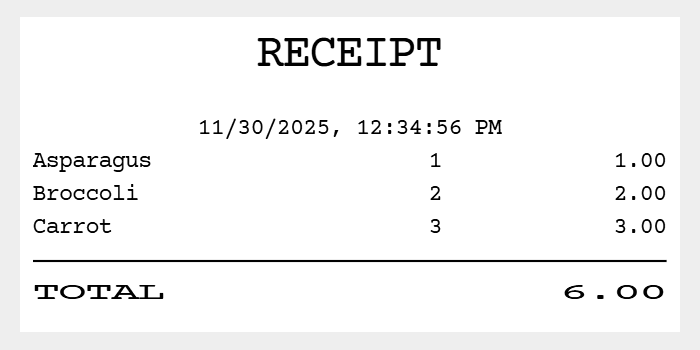
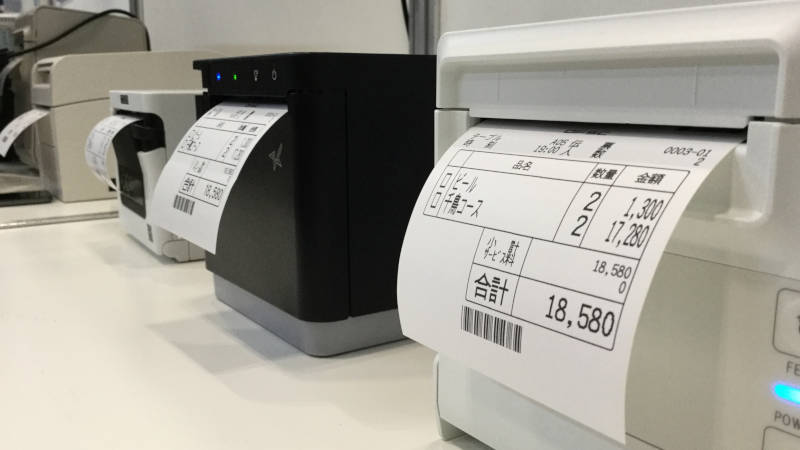
ReceiptSharp is simple printing library for receipt printers that prints with easy markdown data for receipts and returns printer status. Even without a printer, it can output images.
ReceiptSharp auto-detects printer models for seamless printing.
A development tool is provided to edit, preview, and print the receipt markdown.
https://receiptline.github.io/receiptjs-designer/
- Epson TM series
- Seiko Instruments RP series
- Star MC series
- Citizen CT series
- Fujitsu FP series
Connect with IP address or serial port.
(LAN, Bluetooth, virtual serial port, and real serial port)
Epson TM series (South Asia model) and Star MC series (StarPRNT model) can print with device font of Thai characters.
Namespace: ReceiptSharp
Print receipt markdown text and notify printer status.
using ReceiptSharp;

string example = @"^^^RECEIPT

11/30/2025, 12:34:56 PM
Asparagus | 1| 1.00
Broccoli  | 2| 2.00
Carrot    | 3| 3.00
---
^TOTAL | ^6.00";

ReceiptSession session = new ReceiptSession("COM1");
session.StatusChanged += (sender, e) =>
{
    Console.WriteLine(e);
};
session.Ready += async (sender, e) =>
{
    string result = await session.Print(example, "-c 42 -u");
    Console.WriteLine(result);
};
session.Open();
Console.ReadLine();
session.Close();| Name | Description |
|---|---|
| ReceiptSession(String) | Create instance. |
| Name | Description |
|---|---|
| Status | Printer status. |
| Drawer | Cash drawer status. |
| Name | Description |
|---|---|
| Open() | Open session. |
| Print(String, String) | Print receipt markdown. |
| InvertDrawerState(Boolean) | Invert cash drawer state. |
| Close() | Close session. |
| Name | Description |
|---|---|
| StatusChanged | Printer status updated. |
| Ready | Ready to print. |
| Online | Printer is online. |
| CoverOpen | Printer cover is open. |
| PaperEmpty | No receipt paper. |
| Error | Printer error (except cover open and paper empty). |
| Offline | Printer is off or offline. |
| Disconnect | Printer is not connected. |
| DrawerChanged | Drawer status updated. |
| DrawerClosed | Drawer is closed. |
| DrawerOpen | Drawer is open. |
public ReceiptSession(string destination)The ReceiptSession() constructor creates a new ReceiptSession instance.
destination- IP address or serial port of target printer
Serial port options:
"COM1:115200N81"<port name>[:<options>]<options><baud rate>,<parity>,<data bits>,<stop bits>[,<flow control>]- Default:
9600,N,8,1,N - Commas can be omitted
<baud rate>2400,4800,9600,19200,38400,57600,115200
<parity>N: None,E: Even,O: Odd
<data bits>8,7
<stop bits>1,2
<flow control>N: None,R: RTS/CTS,X: XON/XOFF
- A new ReceiptSession instance.
public string Status { get; }The Status property is a string representing the printer status.
- A string representing the printer status.
Online: Printer is onlinePrint: Printer is printingCoverOpen: Printer cover is openPaperEmpty: No receipt paperError: Printer error (except cover open and paper empty)Offline: Printer is off or offlineDisconnect: Printer is not connected
public string Drawer { get; }The Drawer property is a string representing the cash drawer status.
- A string representing the cash drawer status.
DrawerClosed: Drawer is closedDrawerOpen: Drawer is openOffline: Printer is off or offlineDisconnect: Printer is not connected
public void Open()The Open() method starts a session and connects to the target printer.
public async Task<string> Print(string markdown, string options = "")The Print() method prints a receipt markdown text.
markdown- Receipt markdown text
options-c <chars>: Characters per line- Range:
24-96 - Default:
48
- Range:
-l <language>: Language of receipt markdown texten,fr,de,es,po,it,ru, ...: Multilingual (cp437, 852, 858, 866, 1252 characters)ja: Japanese (shiftjis characters)ko: Korean (ksc5601 characters)zh-hans: Simplified Chinese (gb18030 characters)zh-hant: Traditional Chinese (big5 characters)th: Thai- Default: System locale
-s: Paper saving (reduce line spacing)-m [<left>][,<right>]: Print margin- Range (left):
0-24 - Range (right):
0-24 - Default:
0,0
- Range (left):
-u: Upside down-i: Print as image Not implemented-n: No paper cut-b <threshold>: Image thresholding- Range:
0-255 - Default: Error diffusion
- Range:
-g <gamma>: Image gamma correction- Range:
0.1-10.0 - Default:
1.0
- Range:
-p <printer>: Printer control languageescpos: ESC/POS (Epson)epson: ESC/POS (Epson)sii: ESC/POS (Seiko Instruments)citizen: ESC/POS (Citizen)fit: ESC/POS (Fujitsu)impact: ESC/POS (TM-U220)impactb: ESC/POS (TM-U220 Font B)generic: ESC/POS (Generic) Experimentalstar: StarPRNTstarline: Star Line Modeemustarline: Command Emulator Star Line Modestargraphic: Star Graphic Modestarimpact: Star Mode on dot impact printers Experimentalstarimpact2: Star Mode on dot impact printers (Font 5x9 2P-1) Experimentalstarimpact3: Star Mode on dot impact printers (Font 5x9 3P-1) Experimental- Default: Auto detection (
epson,sii,citizen,fit,impactb,generic,star)
-v: Landscape orientation- Device font support:
escpos,epson,sii,citizen,star
- Device font support:
-r <dpi>: Print resolution for ESC/POS, landscape, and device font- Values:
180,203 - Default:
203
- Values:
- A Task that fulfills with a string once the print result is ready to be used.
Success: Printing successPrint: Printer is printingCoverOpen: Printer cover is openPaperEmpty: No receipt paperError: Printer error (except cover open and paper empty)Offline: Printer is off or offlineDisconnect: Printer is not connected
public void InvertDrawerState(bool invert)The InvertDrawerState() method inverts cash drawer state.
invert- If true, invert drawer state
public void Close()The Close() method closes the connection and ends the session.
Namespace: ReceiptSharp
Convert to image, plain text, or printer commands.
using ReceiptSharp;

string example = @"^^^RECEIPT

11/30/2025, 12:34:56 PM
Asparagus | 1| 1.00
Broccoli  | 2| 2.00
Carrot    | 3| 3.00
---
^TOTAL | ^6.00";

Receipt receipt = new Receipt(example, "-c 42 -l en");
string svg = receipt.ToSvg();
Console.WriteLine(svg);
string txt = receipt.ToText();
Console.WriteLine(txt);| Name | Description |
|---|---|
| Receipt(String, String) | Create instance. |
| Name | Description |
|---|---|
| ToSvg() | Convert receipt markdown to SVG. |
| ToPng() | Convert receipt markdown to PNG. Not implemented |
| ToText() | Convert receipt markdown to text. |
| ToCommand() | Convert receipt markdown to printer commands. |
| ToString() | Return string representing this object. |
public Receipt(string markdown, string options = "")The Receipt() constructor creates a new Receipt instance.
markdown- Receipt markdown text
options-p <printer>: Printer control languageescpos: ESC/POS (Epson)epson: ESC/POS (Epson)sii: ESC/POS (Seiko Instruments)citizen: ESC/POS (Citizen)fit: ESC/POS (Fujitsu)impact: ESC/POS (TM-U220)impactb: ESC/POS (TM-U220 Font B)generic: ESC/POS (Generic) Experimentalstar: StarPRNTstarline: Star Line Modeemustarline: Command Emulator Star Line Modestargraphic: Star Graphic Modestarimpact: Star Mode on dot impact printers Experimentalstarimpact2: Star Mode on dot impact printers (Font 5x9 2P-1) Experimentalstarimpact3: Star Mode on dot impact printers (Font 5x9 3P-1) Experimental
-c <chars>: characters per line- Range:
24-96 - Default:
48
- Range:
-l <language>: Language of receipt markdown texten,fr,de,es,po,it,ru, ...: Multilingual (cp437, 852, 858, 866, 1252 characters)ja: Japanese (shiftjis characters)ko: Korean (ksc5601 characters)zh-hans: Simplified Chinese (gb18030 characters)zh-hant: Traditional Chinese (big5 characters)th: Thai- Default: System locale
-s: Paper saving (reduce line spacing)-m [<left>][,<right>]: Print margin- Range (left):
0-24 - Range (right):
0-24 - Default:
0,0
- Range (left):
-u: Upside down-i: Print as image Not implemented-n: No paper cut-b <threshold>: Image thresholding- Range:
0-255 - Default: Error diffusion
- Range:
-g <gamma>: Image gamma correction- Range:
0.1-10.0 - Default:
1.0
- Range:
-v: Landscape orientation- Device font support:
escpos,epson,sii,citizen,star
- Device font support:
-r <dpi>: Print resolution for ESC/POS, landscape, and device font- Values:
180,203 - Default:
203
- Values:
- A new Receipt instance.
public string ToSvg()The ToSvg() method converts to SVG.
- A string representing the SVG.
public string ToPng()The ToPng() method converts to PNG.
- A string representing the PNG in data URL format.
public string ToText()The ToText() method converts to plain text.
- A string representing the plain text.
public byte[] ToCommand()The ToCommand() method converts to printer commands.
- A byte array representing the printer commands.
public override string ToString()The ToString() method returns a string representing the receipt markdown text.
- A string representing the receipt markdown text.
This language conforms to the OFSC ReceiptLine Specification.
https://www.ofsc.or.jp/receiptline/en/
ReceiptLine is the receipt description language that expresses the output image of small roll paper.
It supports printing paper receipts using a receipt printer and displaying electronic receipts on a POS system or smartphone.
It can be described simply with receipt markdown text data that does not depend on the paper width.
document
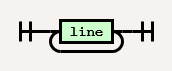
line

columns
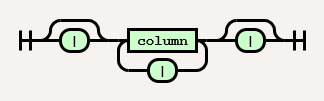
column
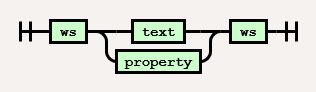
text
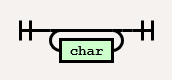
char

escape

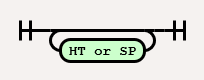
ws (whitespace)
property
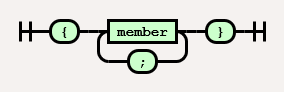
member

key

value
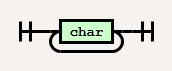
The receipt is made of a table, which separates each column with a pipe |.
| Line | Content | Description |
|---|---|---|
column| column || columncolumn | |
Text Property |
Single column |
column | column | column | column || column | columncolumn | column | |
Text | Double column |
column | ... | column| column | ... | column || column | ... | columncolumn | ... | column | |
Text | Multiple columns |
The column is attracted to the pipe | like a magnet.
␣ means one or more whitespaces.
| Column | Description |
|---|---|
column|column||␣column␣| |
Center |
|column|column␣|column ␣| |
Left |
column||␣column||␣column |
Right |
The text is valid for any column.
Asparagus | 0.99
Broccoli | 1.99
Carrot | 2.99
---
^TOTAL | ^5.97
Characters are printed in a monospace font (12 x 24 px).
Wide characters are twice as wide as Latin characters (24 x 24 px).
Control characters are ignored.
Special characters are assigned to characters that are rarely used in the receipt.
| Special character | Description |
|---|---|
\ |
Character escape |
| |
Column delimiter |
{ |
Property delimiter (Start) |
} |
Property delimiter (End) |
- (1 or more, exclusive) |
Horizontal rule |
= (1 or more, exclusive) |
Paper cut |
~ |
Space |
_ |
Underline |
" |
Emphasis |
` |
Invert |
^ |
Double width |
^^ |
Double height |
^^^ |
2x size |
^^^^ |
3x size |
^^^^^ |
4x size |
^^^^^^ |
5x size |
^^^^^^^ (7 or more) |
6x size |
Escape special characters.
| Escape sequence | Description |
|---|---|
\\ |
\ |
\| |
| |
\{ |
{ |
\} |
} |
\- |
- (Cancel horizontal rule) |
\= |
= (Cancel paper cut) |
\~ |
~ |
\_ |
_ |
\" |
_ |
\` |
` |
\^ |
^ |
\n |
Wrap text manually |
\xnn |
Hexadecimal character code |
\char (Others) |
Ignore |
The property is valid for lines with a single column.
Text, images, barcodes, and 2D codes cannot be placed on the same line.
{ width: * 10; comment: the column width is specified in characters }
| Key | Abbr | Value | Default | Description |
|---|---|---|---|---|
image |
i |
base64 png format | - | Insert image Drag a PNG file, hold [Shift] and drop it on a blank line (Recommended: monochrome, critical chunks only) |
code |
c |
textdata | - | Insert barcode / 2D code |
command |
x |
textdata | - | Insert device-specific commands |
comment |
_ |
textdata | - | Insert comment |
option |
o |
see below | code128 2 72 nohri 3 l |
Set barcode / 2D code options (Options are separated by commas or one or more whitespaces) |
border |
b |
linespacenone0 - 2 |
space |
Set column border (chars) (Border width: line=1, space=1, none=0) |
width |
w |
auto*0 - |
auto( * for all columns) |
Set column widths (chars) (Widths are separated by commas or one or more whitespaces) |
align |
a |
leftcenterright |
center |
Set line alignment (Valid when line width < characters per line) |
text |
t |
wrapnowrap |
wrap |
Set text wrapping |
Barcode options are separated by commas or one or more whitespaces.
| Barcode option | Description |
|---|---|
upc |
UPC-A, UPC-E (Check digit can be omitted) |
eanjan |
EAN-13, EAN-8 (Check digit can be omitted) |
code39 |
CODE39 |
itf |
Interleaved 2 of 5 |
codabarnw7 |
Codabar (NW-7) |
code93 |
CODE93 |
code128 |
CODE128 |
2 - 4 |
Barcode module width (px) |
24 - 240 |
Barcode module height (px) |
hri |
With human readable interpretation |
nohri |
Without human readable interpretation |
2D code options are separated by commas or one or more whitespaces.
| 2D code option | Description |
|---|---|
qrcode |
QR Code |
3 - 8 |
Cell size (px) |
lmqh |
Error correction level |
Special characters in property values are different from special characters in text.
| Special character | Description |
|---|---|
\ |
Character escape |
| |
Column delimiter |
{ |
Property delimiter (Start) |
} |
Property delimiter (End) |
: |
Key-value separator |
; |
Key-value delimiter |
Escape special characters.
| Escape sequence | Description |
|---|---|
\\ |
\ |
\| |
| |
\{ |
{ |
\} |
} |
\; |
; |
\n |
New line |
\xnn |
Hexadecimal character code |
\char (Others) |
Ignore |