


Type hints → Web UI. Minimal-boilerplate web apps from Python functions.
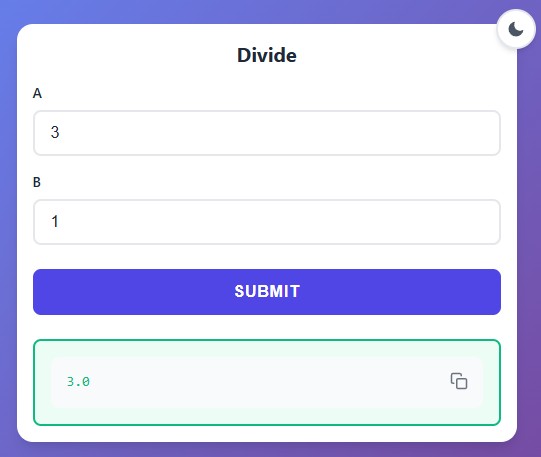
pip install func-to-webfrom func_to_web import run
def divide(a: float, b: float):
return a / b
run(divide)Open |
|
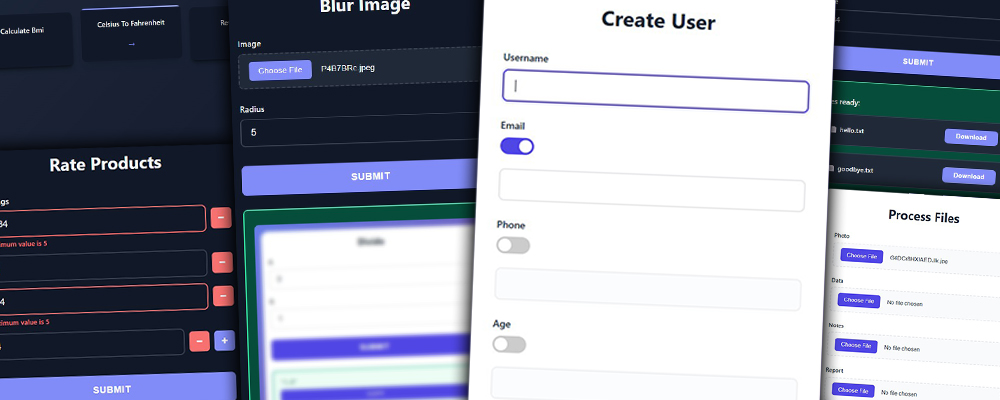
Complete documentation with examples and screenshots for each feature:
|
|
Full Documentation API Reference
- ✅ Rapid Prototyping - From pure Python function to usable web interface in seconds.
- ✅ Image Processing - Upload, process, and download images with PIL/Pillow.
- ✅ Data Science & Reporting - Instantly publish Pandas/Polars DataFrames and matplotlib plots without frontend code.
- ✅ High-Performance File Transfer - Stream uploads and downloads at native network/disk speeds. Handles massive files efficiently with minimal memory footprint.
- ✅ Secure Internal Apps - Admin panels, dashboards, and team tools protected by built-in authentication.
from pathlib import Path
from func_to_web import run
from func_to_web.types import File

desktop_path = Path.home() / "Desktop"

def upload_files(
    files: list[File],
):
    for f in files:
        print(f"Uploaded file: {f}")
    return "Files uploaded successfully!"

run(upload_files, auto_delete_uploads=False, uploads_dir=desktop_path)Protect sensitive tools with built-in authentication in one line.
import subprocess
from typing import Literal
from func_to_web import run

# 🔒 MANDATORY: Use HTTPS (Nginx).

def restart_service(service: Literal['nginx', 'gunicorn', 'celery']):
    """Restarts a system service."""
    # check=True raises an error shown in the Web UI if the command fails
    subprocess.run(["sudo", "supervisorctl", "restart", service], check=True)
    return f"✅ Service {service} restarted."

run(restart_service, auth={"admin": "super_secret_password"})Generate QR codes instantly from text.
import qrcode
from func_to_web import run

def make_qr(text: str):
    """Returns a QR code image for the given text."""
    return qrcode.make(text).get_image()

run(make_qr)Merge multiple PDF files into a single document instantly.
from io import BytesIO
from pypdf import PdfWriter
from func_to_web import run
from func_to_web.types import DocumentFile, FileResponse

def merge_pdfs(files: list[DocumentFile]):
    """Upload PDFs and get a single merged file back."""
    merger = PdfWriter()
    for pdf in files:
        merger.append(pdf)

    output = BytesIO()
    merger.write(output)

    return FileResponse(data=output.getvalue(), filename="merged.pdf")

run(merge_pdfs)
Check the examples/ folder for +20 complete examples (Covers all features)
Core:
- Python 3.10+
- FastAPI, Uvicorn, Pydantic, Jinja2, python-multipart, itsdangerous
Optional (for extended functionality):
- Pillow, Matplotlib, Pandas, NumPy, Polars
Development:
- pytest, mkdocs, mkdocs-material
pytest tests/ -vMIT License • Made by Beltrán Offerrall • Contributions welcome!