| title | emoji | colorFrom | colorTo | sdk | sdk_version | app_file | pinned | short_description | tags | ||
|---|---|---|---|---|---|---|---|---|---|---|---|
Inspect Web Mcp |
😻 |
purple |
red |
gradio |
5.49.1 |
app.py |
false |
AI-powered web debugging with visual element inspection |
|


AI-powered visual debugging for React & Vue via MCP and ACP.
Works with any MCP-compatible AI client. Supports ACP agents: Claude Code, Codex CLI, Gemini CLI, OpenCode, and more.
Click any element → AI diagnoses issues, inspects source, analyzes network, and provides fixes.
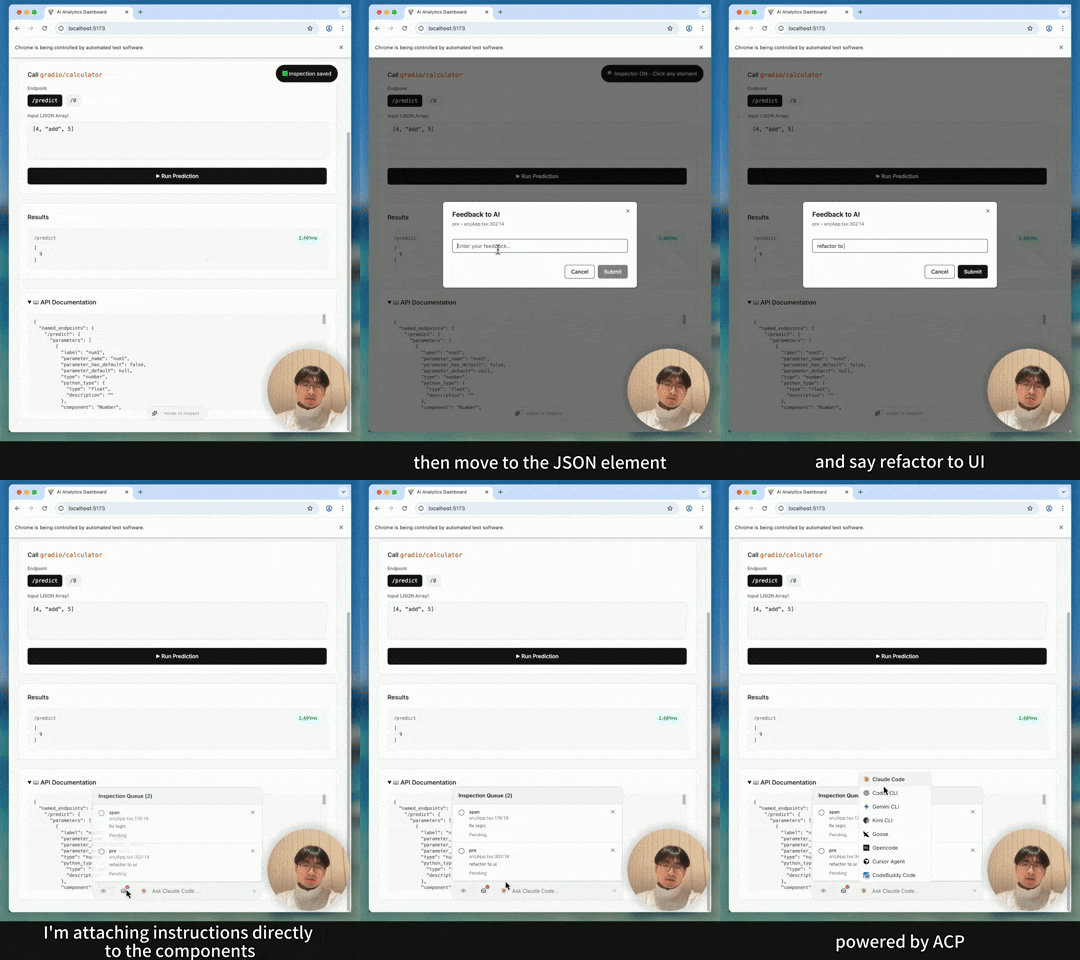
👉 Watch the demo: https://www.youtube.com/shorts/TCt2oOtPS_k
🐦 Twitter/X Post: https://x.com/yaoandyan/status/1995082020431753600
- yaonyan - Project Creator
This project uses the following sponsor APIs and platforms:
- Anthropic - Claude API for MCP integration testing and AI-powered debugging capabilities
- Gradio -
@gradio/clientfor connecting to Gradio-powered APIs in the demo app
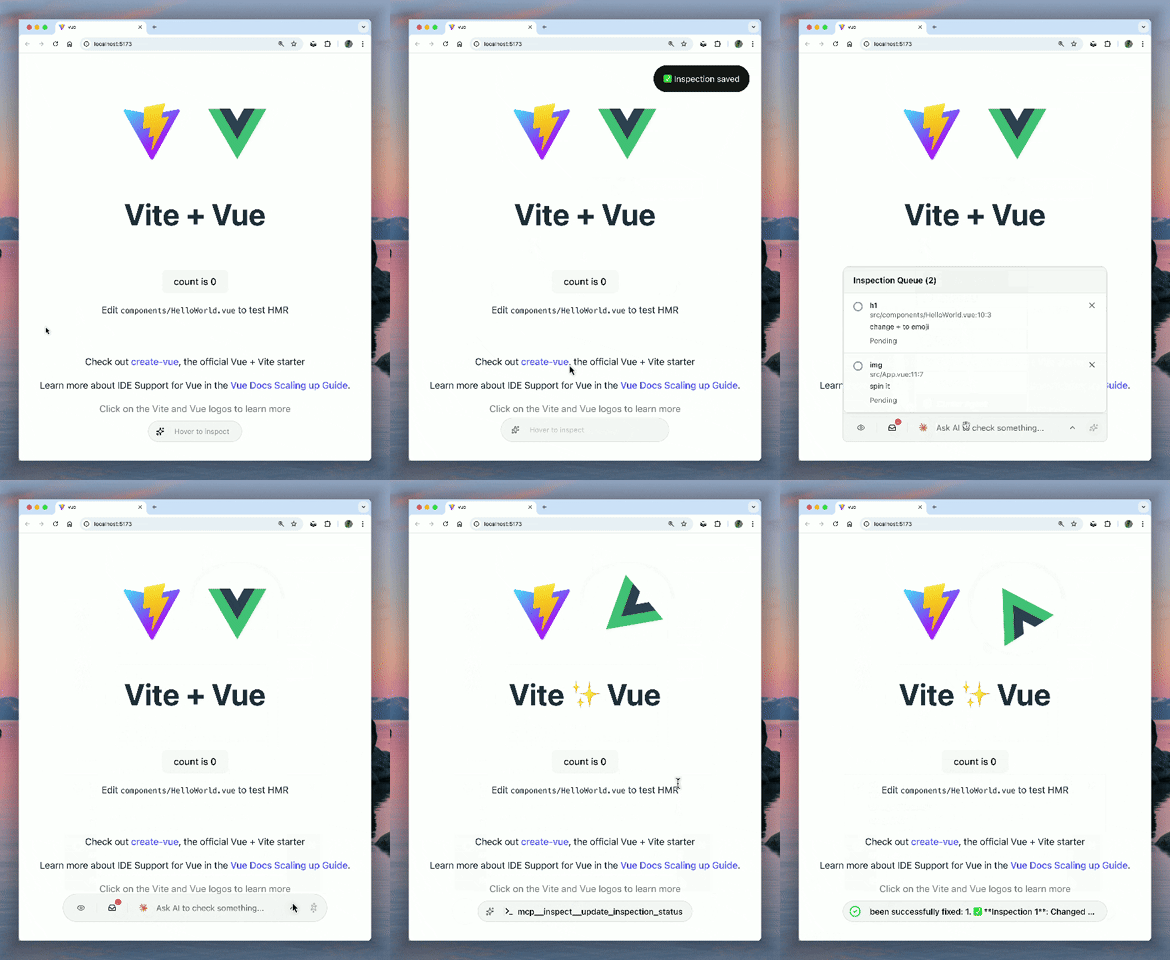
Click any element to instantly send its source code location, computed styles, and DOM hierarchy to AI. No more explaining "it's the blue button in the header".
AI can access Chrome DevTools to analyze network requests, console logs, and performance metrics. It sees what you see.
Switch between agents (Claude Code, Goose) and track their debugging progress visually with step-by-step status updates.
# npm
npm i -D @mcpc-tech/unplugin-dev-inspector-mcp
# pnpm
pnpm add -D @mcpc-tech/unplugin-dev-inspector-mcp
# yarn
yarn add -D @mcpc-tech/unplugin-dev-inspector-mcp
// vite.config.ts
import DevInspector from '@mcpc-tech/unplugin-dev-inspector-mcp';
import react from '@vitejs/plugin-react'; // or vue()
export default {
plugins: [
DevInspector.vite({
enabled: true,
enableMcp: true,
}),
react(), // or vue()
],
};💡 Troubleshooting: If source locations show
unknown:0:0, try movingDevInspector.vite()before framework plugins likereact(),vue(), orpreact(). This ensures source location injection happens before JSX transformation.
Currently supports Vite. Webpack, Rollup, esbuild, and Rspack support coming soon.
If your project doesn't use HTML files (e.g., miniapp platforms that only bundle JS):
// vite.config.ts
DevInspector.vite({
  enabled: true,
  autoInject: false  // Disable HTML injection
})
// main.ts or app entry point
import 'virtual:dev-inspector-mcp'; // ← Add this import✅ Zero Production Impact: This import is automatically removed in production builds via tree-shaking. The entire dev-inspector code is wrapped in if (import.meta.env.DEV) guards, which bundlers statically replace with false during production builds.
If virtual:dev-inspector-mcp conflicts with your project, you can customize it:
// vite.config.ts
DevInspector.vite({
  enabled: true,
  autoInject: false,
  virtualModuleName: 'virtual:my-custom-inspector'  // ← Custom name
})
// main.ts
import 'virtual:my-custom-inspector'; // ← Use your custom nameThe plugin automatically updates MCP configuration files for detected editors when the dev server starts. This saves you from manually configuring MCP endpoints.
Supported editors: Cursor, VSCode, Windsurf, Claude Code
// vite.config.ts
DevInspector.vite({
  // Auto-detect and update (default: true)
  updateConfig: true,

  // Or specify editors manually
  updateConfig: ['cursor', 'vscode'],

  // Or disable
  updateConfig: false,

  // Server name in MCP config (default: 'dev-inspector')
  updateConfigServerName: 'my-app-inspector',
})
Custom editors: For non-standard editors, use customEditors:
DevInspector.vite({
  customEditors: [
    {
      id: 'my-editor',
      name: 'My Editor',
      configPath: '~/.my-editor',        // absolute, ~/relative, or project-relative
      configFileName: 'mcp.json',
      serverUrlKey: 'url',               // default: 'url'
      configFormat: 'mcpServers',        // 'mcpServers' or 'servers' (vscode-style)
    },
  ],
})This plugin uses the Agent Client Protocol (ACP) to connect with AI agents.
⏱️ Note: Initial connection may be slow as agents are launched via npx (downloads packages on first run).
Default agents: View configuration →
You can customize available AI agents and set a default agent:
// vite.config.ts
export default {
  plugins: [
    DevInspector.vite({
      enabled: true,
      enableMcp: true,
      // Custom agents (will be merged with default properties)
      agents: [
        {
          name: "Claude Code", // Matches default - auto-fills icon and env
          command: "npx",
          args: ["-y", "@zed-industries/claude-code-acp"],
        },
        {
          name: "My Custom Agent",
          command: "my-agent-cli",
          args: ["--mode", "acp"],
          env: [{ key: "MY_API_KEY", required: true }],
          meta: { icon: "https://example.com/icon.svg" }
        }
      ],
      // Set default agent to show on startup
      defaultAgent: "Claude Code"
    }),
  ],
};
Key Features:
- Custom agents with the same name as default agents automatically inherit missing properties (icons, env)
- You can override just the command/args while keeping default icons
- If no custom agents provided, defaults are: Claude Code, Codex CLI, Gemini CLI, Kimi CLI, Goose, OpenCode
Click element → Describe issue → AI analyzes → Get fix
- Click any UI element to capture context (source, styles, DOM)
- Describe what's wrong or ask a question about the element
- AI diagnoses using Chrome DevTools integration
- Get intelligent solutions through natural conversation
Examples:
- "Why is this button not clickable?" → AI checks
pointer-events, z-index, overlays - "This API call is failing" → AI analyzes network requests, timing, responses
- "Where is this component?" → Jump to source file and line number
Activates visual selector. Returns source location, DOM hierarchy, styles, dimensions, and user notes.
Shows all inspections with ID, element details, notes, and status (pending/in-progress/completed/failed).
Updates inspection status with optional progress steps.
Parameters: status, message (required for completed/failed), progress, inspectionId (optional)
Executes JavaScript in browser context. Access to window, document, React/Vue instances, localStorage.
Agentic tool for Chrome DevTools access. Provides network inspection, console logs, performance metrics, element interaction, and more.
Capture and analyze UI element context.
View all pending, in-progress, and completed inspections.
Opens Chrome with DevTools API. Unlocks network analysis, console logs, performance metrics.
Parameter: url (defaults to dev server)
💡 Optional if Chrome is already open. Use when you need to launch a new Chrome instance.
List network requests or get details of a specific one. Always refreshes the list first.
Parameter: reqid (optional) - If provided, get details for that request. If omitted, just list all requests.
List console messages or get details of a specific one. Always refreshes the list first.
Parameter: msgid (optional) - If provided, get details for that message. If omitted, just list all messages.
MIT