Stop building the same backend dashboard for the hundredth time. Start shipping faster.
If you're like most developers, you've probably built the backend dashboard for a SaaS/App a dozen times. It's always the same stuff: auth, data tables, settings, user profiles... It gets repetitive, and most starters out there are either just pretty UI kits with no real logic, or they look incredibly... well, cliche.
Open Dashboard is different. It's an open-source, production-ready starter designed to give you a massive head start, not just a design file.
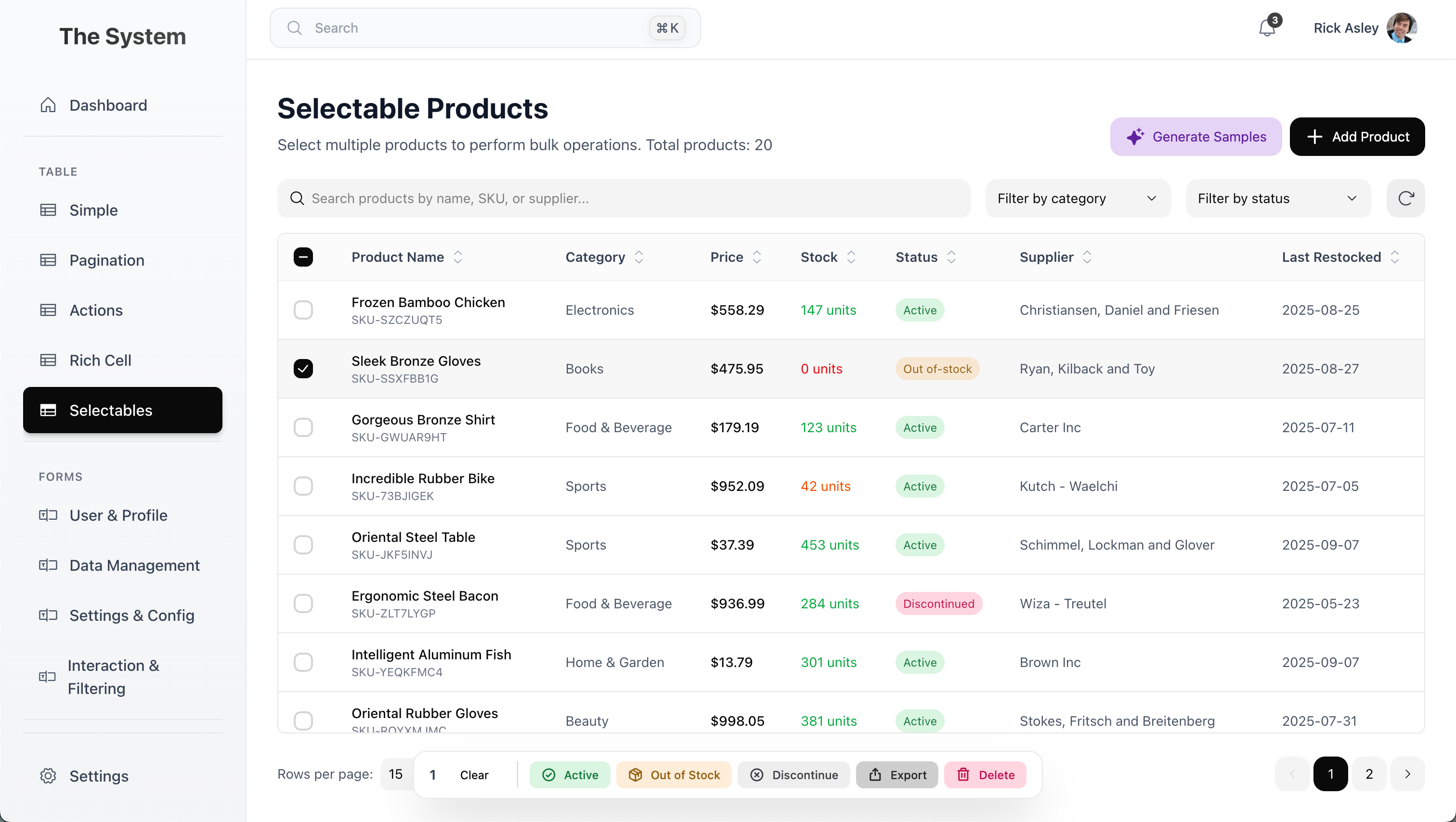
We're not just giving you some static HTML/CSS components. This is a production-ready foundation with real, working features. The goal is to get you from idea to launch faster, without sacrificing quality or features.
We designed it so that building complex UIs is dead simple. Want a feature-rich table with server-side pagination, filtering, and sorting? It's basically like crafting a toy. You just plug in the module and connect your data.
We put a ton of effort into making an interface that is aesthetically designed, clean, and modern. You can finally have a backend that looks as good as your marketing site. No more boring, cookie-cutter admin panels.
- Comprehensive Dashboard Overview with charts and key metrics
- Multiple Table Variations:
- Simple tables for basic data display
- Server-side pagination for large datasets
- Selectable rows for bulk actions
- "Rich Cell" tables with progress bars, avatars, and interactive elements
- Full CRUD Operations on a Product Management page example
- Command Palette (⌘+K) for fast navigation and actions
- Auth & Error Pages (Login, Register, 403 Forbidden, etc.) ready to go
- Type-safe with full TypeScript support
- Production-ready architecture with Next.js 15 App Router
- Bun (recommended) or Node.js 18+
# Clone the repository
git clone https://github.com/SinoAHpx/open-saas-next.git
cd open-saas-next

# Install dependencies
bun install

# Start development server
bun run dev
Open http://localhost:3000 in your browser to see the dashboard.
This is a modern Next.js 15 application built with:
- Next.js 15.5.4 - React framework with App Router
- React 19.1.0 - Latest React version
- TypeScript 5 - Full type safety with strict mode
- Bun - Fast runtime and package manager
- Turbopack - Next-generation bundler for blazing-fast development
- Tailwind CSS v4 - Utility-first CSS framework
- Hero UI - Beautiful component library
- Phosphor Icons - Modern icon system
- Framer Motion - Smooth animations
- Zustand - Simple, efficient state management
- TanStack Table - Powerful table component with sorting, filtering, pagination
- Recharts - Beautiful, composable charts
- Zod - Schema validation
- TypeORM - Database ORM ready to connect
- Biome - Fast linter and formatter
- Strict TypeScript configuration
- Path mapping (
@/*for clean imports)
open-saas-next/
├── src/
│   ├── app/              # Next.js App Router pages and layouts
│   │   ├── (auth)/       # Authentication pages (login, register)
│   │   ├── (dashboard)/  # Dashboard pages with shared layout
│   │   └── api/          # API routes
│   ├── components/       # Reusable UI components
│   ├── lib/              # Utility functions and helpers
│   └── stores/           # Zustand state management stores
├── public/               # Static assets
├── scripts/              # Build and utility scripts
└── config files          # Configuration files (Next.js, Tailwind, TypeScript, etc.)
bun run dev- Start development server with Turbopackbun run build- Build for productionbun run start- Start production serverbun run lint- Run Biome linterbun run format- Format code with Biomebun run create-page- Scaffold a new page (custom script)
The template includes several example pages demonstrating common patterns:
- Main Dashboard - Overview with charts and key metrics
- Simple Table - Basic data table implementation
- Pagination - Table with server-side pagination
- Actions - Table with row actions
- Compound - Complex table with multiple features
- Selectables - Table with row selection and bulk actions
- Rich Cell - Table with custom cell rendering (progress bars, avatars, etc.)
- Product Management - Full CRUD example
- Settings - User settings page
Use the custom page scaffolding script:
bun run create-pageEdit src/lib/sidebar-items.ts to add or remove sidebar navigation items.
Modify tailwind.config.ts and src/lib/color-theme.ts for theme customization.
TypeScript is configured with path mapping for cleaner imports:
import { Component } from '@/components/Component'
import { util } from '@/lib/util'bun run build
bun run startThe easiest way to deploy is using Vercel:
We're actively developing this project and looking for ideas. What's the one feature you always hate building over and over in a dashboard? Let us know by opening an issue or starting a discussion.
Some ideas we're considering:
- Role-based access control (RBAC)
- File upload with preview
- Advanced filtering and search
- Real-time notifications
- Email templates
- Audit logs
- Multi-tenancy support
Contributions are welcome! This is a real tool meant to help the developer community. Please feel free to:
- Open issues for bugs or feature requests
- Submit Pull Requests
- Star the repo if you find it useful
- Share it with others who might benefit
This project is open source and available under the MIT License.
If you have any questions or run into issues, please open an issue on GitHub.
Give it a star if you like it! Your support helps us continue improving and adding new features.