Visual Studio Code智能提示
-
Code -> 首选项 -> 用户代码片段,选择xml
-
在打开的xml.json中将下面文件中的内容粘贴到里边保存 https://raw.githubusercontent.com/zhenglibao/FlexLib/master/Doc/res/vscode-xml.json
-
Code -> 首选项 -> 设置 , 在打开的用户设置中添加如下内容
"editor.quickSuggestions": {
    "other": true,
    "comments": true,
    "strings": true
}
然后你就可以方便的使用vscode来编辑布局文件了 😀
编辑时智能提示效果如下:
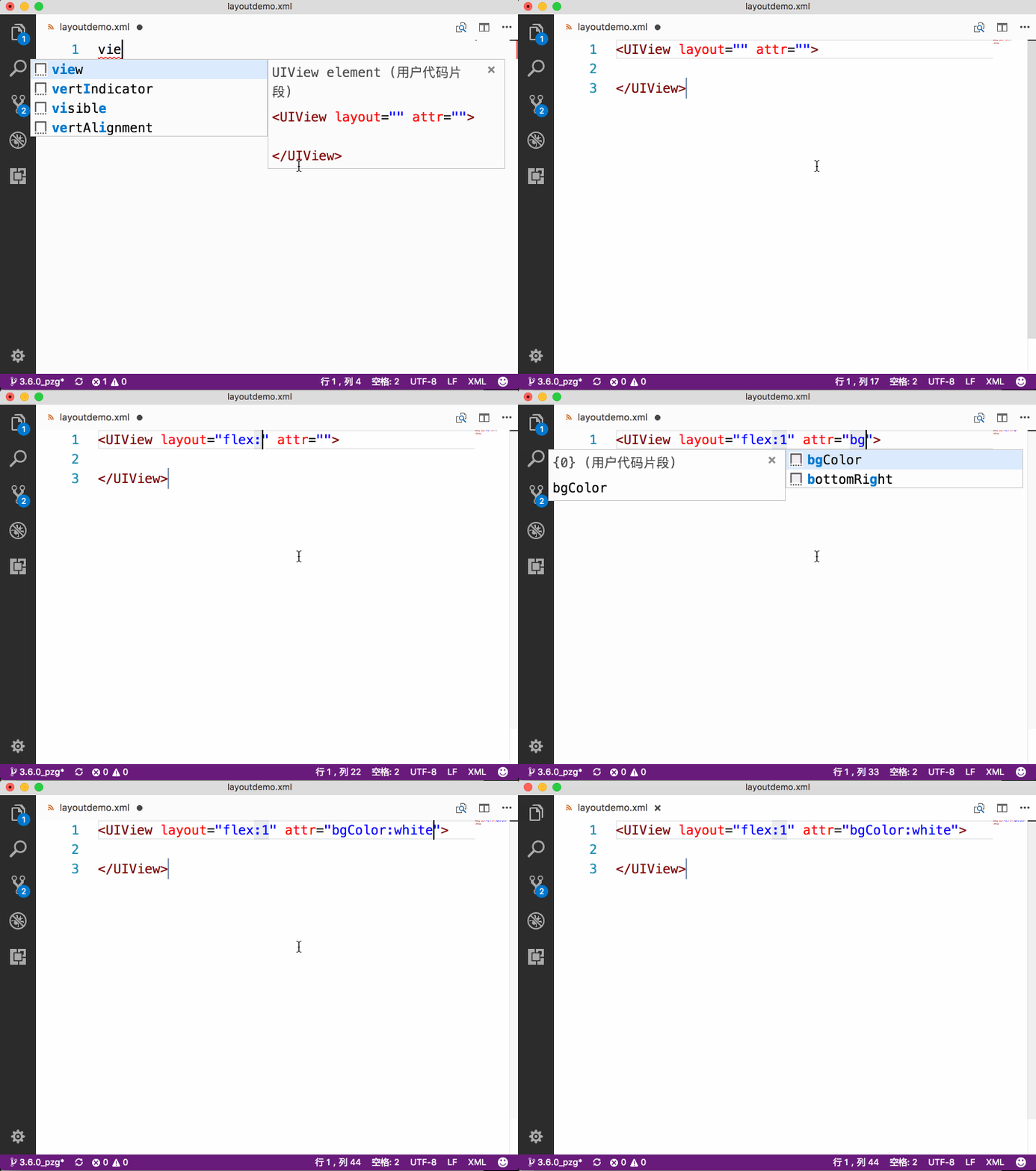
打开Finder,选择一个xml文件,右击选择“显示简介”,在弹出的面板中的“打开方式”中选择Visual Studio Code,然后点击“全部更改”,关闭窗口。 在XCode中右击文件,选择“Open With External Editor”即可打开,同时也可以在Preferences中绑定快捷键。
去除控件前缀将自动替换成完整的组件,如
label ===>
textview ===>
其他提示的内容将直接等效于所提示的内容,如
UILabel ====> UILabel
white ====> white