An intelligent task management assistant built with Microsoft Agent Framework, Azure OpenAI, and .NET Aspire, demonstrating Clean Architecture, autonomous AI agents, and production-grade observability with Azure Content Safety protection.

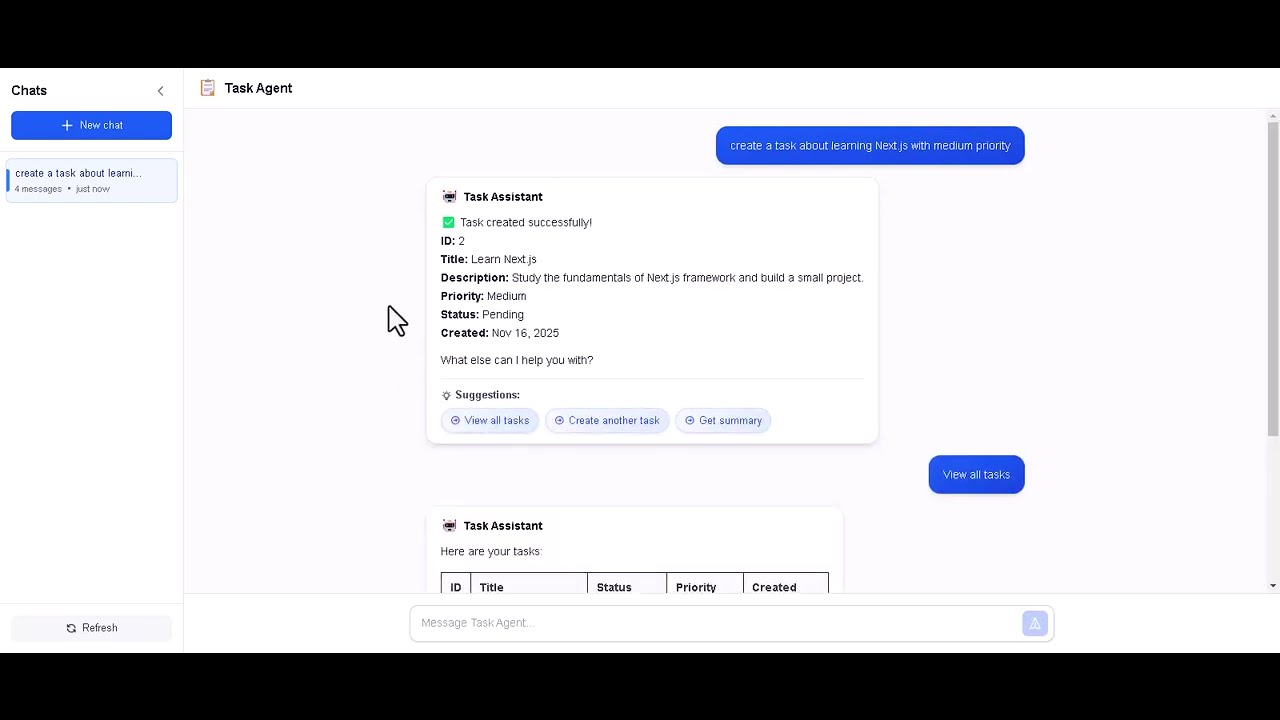
Watch the full demonstration of the Task Agent in action, showcasing:
- Natural language task management
- AI-powered suggestions and insights
- Content Safety protection
- Real-time conversation management
- Modern Next.js frontend with ChatGPT-inspired UI
This project is documented in a comprehensive article series on C# Corner:
- Building a Task Management AI Agent - Microsoft Agent Framework, Azure OpenAI integration, and Clean Architecture
- Securing AI Agents - Azure AI Content Safety with Prompt Shield and parallel validation
- Production-Grade Observability - .NET Aspire, OpenTelemetry, and Application Insights
- Modern Frontend Architecture - Next.js 16 separation, dual-database strategy, and Azure Static Web Apps
Topics Covered:
- 🤖 Autonomous AI agents with function calling
- 🛑 Multi-layer security (Prompt Shield + Content Moderation)
- 📈 Production observability (Aspire Dashboard + Application Insights)
- ⚛️ Modern React with Next.js 16 and TypeScript
- 🗄️ Dual-database architecture (SQL Server + PostgreSQL)
- ☁️ Azure deployment with Static Web Apps
# 1. Configure your Azure credentials in src/backend/services/TaskAgent/src/TaskAgent.WebApi/appsettings.Development.json

# 2. Setup PostgreSQL database (see docs/POSTGRESQL_MIGRATION.md for details)

# 3. Run with .NET Aspire (includes Aspire Dashboard)
dotnet run --project src/TaskAgent.AppHost

# Or run backend standalone
cd src/backend/services/TaskAgent/src
dotnet run --project TaskAgent.WebApi

# 4. Run frontend (separate terminal)
cd src/frontend/task-agent-web
pnpm install
pnpm devAccess:
- Frontend: http://localhost:3000
- Backend API: https://localhost:5001
- Aspire Dashboard: https://localhost:17198 (when using Aspire)
Backend Features:
- 💬 Natural Language Interface: Talk to your task manager like a person
- 🛡️ Multi-Layer Security: Azure Content Safety protection (Prompt Shield + Content Moderation)
- 📊 Production-Grade Observability: Full OpenTelemetry stack with .NET Aspire
- ✅ Complete CRUD: Create, read, update, and delete tasks
- 📈 Smart Analytics: Task summaries with filtering by status and priority
- 🎨 Beautiful Tables: Markdown-formatted responses with emojis
- 💡 Contextual Suggestions: Agent provides helpful next actions
- 🗄️ PostgreSQL Persistence: Entity Framework Core with JSON storage (preserves property order)
- 💬 Conversation Management: Persistent threads with metadata tracking
- 🔍 Distributed Tracing: End-to-end request tracking with custom activity sources
- 📉 Custom Metrics: Real-time monitoring of AI agent operations
Frontend Features:
- ⚛️ Modern React: Next.js 16 + React 19 with TypeScript
- 🎯 Server Components: Optimized bundle size and performance
- 🎨 ChatGPT-Inspired UI: Full-height adaptive layout with Tailwind CSS 4
- 📐 Smart Layout: Centered welcome state, fixed input when chatting
- 🔄 Independent Scrolling: Fixed header and input, scrollable messages
- 💡 Clickable Suggestions: Interactive suggestion buttons from AI
- ⏳ Contextual Loading: Rotating status messages during processing
- ⚡ Optimistic Updates: Instant message feedback
- 📝 Markdown Rendering: Rich text formatting in chat
- 🎭 Type Safety: Full TypeScript with backend contract alignment
- 🧩 Clean Architecture: Separation of concerns (UI → Hooks → API)
- 📂 Conversation Management: List, load, and delete conversations with auto-generated titles
- 🗂️ Sidebar Navigation: Collapsible sidebar with conversation history
This project implements production-grade observability using .NET Aspire and OpenTelemetry with a hybrid architecture:

Stack: OpenTelemetry → OTLP Exporter → Aspire Dashboard (https://localhost:17198)
Features:
- 📊 Real-time metrics visualization
- 🔍 Distributed tracing with automatic trace correlation
- 📝 Structured logging with log levels and scopes
- 🔗 Dependency mapping (Azure OpenAI, Content Safety, PostgreSQL)
- 🎯 Custom instrumentation for AI agent operations
Stack: OpenTelemetry → Azure Monitor Exporter → Application Insights
Features:
- 📈 Performance monitoring and alerting
- 🗺️ Application Map with dependencies
- 🔥 Live metrics and real-time telemetry
- 📊 Custom dashboards and workbooks
- 🔔 Smart detection and anomaly alerts
Custom AI Agent Metrics:
Meter: "TaskAgent.Agent"

Counters:
- agent.requests         → Total requests to the agent
- agent.function_calls   → Function tool invocations
- agent.errors          → Error count by type

Histograms:
- agent.response.duration → Response time in milliseconds
Built-in Metrics (automatic):
- ASP.NET Core instrumentation (HTTP requests, response times)
- HTTP Client instrumentation (Azure OpenAI, Content Safety calls)
- Runtime instrumentation (GC, thread pool, exceptions)
Custom Activity Sources:
ActivitySource: "TaskAgent.Agent"

Spans:
- Agent.ProcessMessage    → End-to-end message processing
- Function.{FunctionName} → Individual function tool calls

Tags:
- thread.id              → Conversation thread identifier
- function.name          → Called function name
- message.length         → User message size
- response.length        → Agent response size
Built-in Traces (automatic):
- ASP.NET Core HTTP requests
- Entity Framework Core SQL queries (development only)
- HTTP client calls to Azure services
Configuration:
- Formatted messages included
- Log scopes enabled
- Integration with OpenTelemetry
- Automatic correlation with traces
Log Levels:
- Information: Agent operations, function calls
- Warning: Content safety blocks, validation failures
- Error: Exceptions, service failures
Smart Environment Detection:
// Automatically selects exporter based on configuration
if (OTEL_EXPORTER_OTLP_ENDPOINT exists)
    → Use OTLP → Aspire Dashboard

if (APPLICATIONINSIGHTS_CONNECTION_STRING exists)
→ Use Azure Monitor → Application InsightsSecurity: SQL statement capture is disabled in production to prevent sensitive data leakage.
Service Discovery: HTTPS-only in production, HTTP + HTTPS in development.
This application implements 2-layer defense using Azure AI Content Safety with parallel execution:
- Detects prompt injection attacks (jailbreaks, instruction override, role manipulation)
- REST API:
/contentsafety/text:shieldPrompt(API version 2024-09-01) - Blocks malicious attempts to manipulate the AI system
- Optimized: Trusts Azure's pre-trained model without system context (reduces false positives)
- Analyzes text for harmful content (Hate, Violence, Sexual, Self-Harm)
- SDK: Azure AI Content Safety
- Configurable severity thresholds (0-6 scale)
Blocked Message Handling:
- ✅ Blocked messages appear as assistant responses in chat (not error toasts)
- ✅ Thread placeholders created for conversation continuity (ChatGPT-like UX)
- ✅ Blocked content is NEVER persisted in database (security measure)
- ✅ Automatic sidebar updates when threads are created
- ✅ Smart title regeneration when first valid message is sent after a block
- ✅ Optimized sidebar refresh: only reloads when title changes from null (efficient!)
For detailed testing guide: See docs/CONTENT_SAFETY.md (75+ test cases)
Architecture: Content safety checks run automatically via middleware before any AI processing.
Performance:
- Parallel Execution: Both layers validate simultaneously using
Task.WhenAll(~50% faster) - IHttpClientFactory: Named HttpClient for optimal connection pooling and DNS refresh
- Response Time: ~200-400ms for safe prompts (vs ~400-800ms sequential)
Best Practices:
- Generic conversational refusals (like ChatGPT) - no technical details exposed
- Security violations render as normal bot messages
- No error styling for content safety blocks
Testing: See docs/CONTENT_SAFETY.md for 75+ test cases, known limitations, and troubleshooting guide.
Built with Clean Architecture for maintainability and testability:
┌─────────────────────────────────────────────────┐
│                 Frontend (Next.js)              │
│  • React 19 + TypeScript                        │
│  • Server Components + Client Components        │
│  • Conversation Management UI                   │
└────────────────────┬────────────────────────────┘
                     │ REST API
                     ▼
┌─────────────────────────────────────────────────┐
│              Backend (.NET 10)                  │
│                                                 │
│  Presentation → Infrastructure → Application    │
│                                  → Domain       │
│                                                 │
│  • AI Agent with 6 function tools               │
│  • Content Safety middleware                    │
│  • Dual-database persistence                    │
└─────────────────────────────────────────────────┘
                     │
                     ▼
┌─────────────────────────────────────────────────┐
│             Databases & Services                │
│  • SQL Server: Task entities                    │
│  • PostgreSQL: Conversation threads (JSON)      │
│  • Azure OpenAI: GPT-4o-mini                    │
│  • Azure AI Content Safety                      │
│  • Application Insights                         │
└─────────────────────────────────────────────────┘
For detailed architecture documentation:
- 📘 Backend README - Clean Architecture layers, API endpoints, observability
- 📗 Frontend README - Component structure, state management, API integration
- 📙 Architecture Decisions - Dual-database rationale and patterns
| Technology | Purpose |
|---|---|
| .NET 10 | Modern web framework |
| ASP.NET Core Web API | RESTful API |
| .NET Aspire 13.0.0 | Cloud-native orchestration |
| OpenTelemetry | Observability framework |
| Entity Framework Core 10 | Database ORM |
| SQL Server | Task data persistence |
| PostgreSQL 15+ | Conversation persistence |
| Microsoft Agent Framework | Autonomous AI agents |
| Azure OpenAI (GPT-4o-mini) | Language model |
| Azure AI Content Safety | Security & moderation |
| Technology | Purpose |
|---|---|
| Next.js 16 | React framework |
| React 19 | UI library |
| TypeScript 5 | Type-safe JavaScript |
| Tailwind CSS 4 | Utility-first CSS |
| pnpm | Fast package manager |
| react-markdown | Markdown rendering |
| SWR (planned) | Data fetching & caching |
- .NET 10 SDK
- Node.js 20+ (for Next.js frontend)
- pnpm package manager (
npm install -g pnpm) - PostgreSQL 15+ (see PostgreSQL Setup Guide)
- Azure OpenAI resource with deployed model (GPT-4o-mini recommended)
- Azure AI Content Safety resource
- Azure Application Insights resource (for production)
1. Update appsettings.Development.json:
{
  "AzureOpenAI": {
    "Endpoint": "https://your-openai-resource.openai.azure.com/",
    "ApiKey": "your-openai-api-key",
    "ModelDeployment": "gpt-4o-mini"
  },
  "ContentSafety": {
    "Endpoint": "https://your-contentsafety-resource.cognitiveservices.azure.com/",
    "ApiKey": "your-contentsafety-api-key",
    "HateThreshold": 2,
    "ViolenceThreshold": 2,
    "SexualThreshold": 2,
    "SelfHarmThreshold": 2
  }
}
2. Database Setup:
# Install PostgreSQL 15+ (see docs/POSTGRESQL_MIGRATION.md for detailed instructions)

# Create database
psql -U postgres
CREATE DATABASE "TaskAgentDb";
\q

# Update connection strings in appsettings.Development.json
{
  "ConnectionStrings": {
    "TasksConnection": "Server=localhost;Database=TaskAgentDb;Trusted_Connection=true;",
    "ConversationsConnection": "Host=localhost;Port=5432;Database=taskagent_conversations;Username=postgres;Password=your_password"
  }
}

# Migrations apply automatically on startup
# Or run manually from src/backend/services/TaskAgent/src:
dotnet ef database update --context TaskDbContext --project TaskAgent.Infrastructure --startup-project TaskAgent.WebApi
dotnet ef database update --context ConversationDbContext --project TaskAgent.Infrastructure --startup-project TaskAgent.WebApi
3. Configure Frontend - Create .env.local:
# src/frontend/task-agent-web/.env.local
NEXT_PUBLIC_API_URL=https://localhost:5001
4. Install Frontend Dependencies:
cd src/frontend/task-agent-web
pnpm install
5. Run with Aspire (recommended - runs both backend and prepares for frontend):
# From repository root
dotnet run --project src/TaskAgent.AppHost- Backend API: https://localhost:5001
- Aspire Dashboard: https://localhost:17198
6. Run Frontend (in a separate terminal):
cd src/frontend/task-agent-web
pnpm dev- Frontend: http://localhost:3000
1. Update appsettings.Production.json:
{
  "AzureOpenAI": {
    "Endpoint": "https://your-openai-resource.openai.azure.com/",
    "ApiKey": "your-openai-api-key",
    "ModelDeployment": "gpt-4o-mini"
  },
  "ContentSafety": {
    "Endpoint": "https://your-contentsafety-resource.cognitiveservices.azure.com/",
    "ApiKey": "your-contentsafety-api-key",
    "HateThreshold": 2,
    "ViolenceThreshold": 2,
    "SexualThreshold": 2,
    "SelfHarmThreshold": 2
  },
  "APPLICATIONINSIGHTS_CONNECTION_STRING": "InstrumentationKey=your-key;IngestionEndpoint=https://...",
  "ConnectionStrings": {
    "TasksConnection": "Server=tcp:your-server.database.windows.net,1433;Initial Catalog=TaskAgentDb;User ID=your_user;Password=your_password;Encrypt=True;",
    "ConversationsConnection": "Host=your-postgres-server.postgres.database.azure.com;Port=5432;Database=TaskAgentDb;Username=your_user;Password=your_password;SslMode=Require;"
  }
}
2. Deploy to Azure App Service using standard deployment methods.
The Task Agent provides 6 function tools:
| Function | Description |
|---|---|
CreateTask |
Create new tasks with title, description, priority |
ListTasks |
Show all tasks with optional filters |
GetTaskDetails |
Get detailed info about a specific task |
UpdateTask |
Modify task status or priority |
DeleteTask |
Remove tasks |
GetTaskSummary |
View statistics and analytics |
Example Interactions:
You: Create a high priority task to review the quarterly report
Agent: ✅ Task created! ID: 1, Priority: High

You: Show me all my tasks
Agent: [Displays beautiful Markdown table with all tasks]
      💡 Suggestions: • Filter by priority • Update oldest task

You: Mark task 1 as Completed
Agent: ✅ Task updated! Status changed to Completed
Lists 2+ tasks in beautiful formatted tables with emojis:
- Status: ⏳ Pending, 🔄 InProgress, ✅ Completed
- Priority: 🟢 Low, 🟡 Medium, 🔴 High
Agent provides 1-2 smart suggestions after each operation:
- After creating: "View all tasks" or "Create follow-up"
- After listing: "Filter by priority" or "Update oldest task"
- After completing: "View remaining tasks" or "Get summary"
- Detects many pending tasks → suggests prioritizing
- Celebrates milestones → "🎉 Great! You've completed 5 tasks!"
- Encourages progress
TaskAgentWeb/
├── src/                                           # Source code root
│   │
│   ├── .editorconfig                              # C# code style rules (shared)
│   ├── Directory.Build.props                      # ⭐ MSBuild properties (MUST be at src/ level)
│   ├── Directory.Packages.props                   # ⭐ Central Package Management (MUST be at src/ level)
│   ├── global.json                                # ⭐ .NET SDK + Aspire SDK versions (MUST be at src/ level)
│   │
│   ├── TaskAgent.AppHost/                         # .NET Aspire orchestration (root level)
│   │   ├── AppHost.cs                             # Orchestrates backend (+ future frontend)
│   │   ├── appsettings.json                       # Aspire settings
│   │   └── Properties/launchSettings.json         # Aspire Dashboard launch config
│   │
│   ├── backend/                                   # Backend services (.NET 10 Web API)
│   │   └── ...                                    # See src/backend/services/TaskAgent/README.md
│   │
│   └── frontend/                                  # Frontend applications (Next.js 16)
│       └── ...                                    # See src/frontend/task-agent-web/README.md
│
├── docs/                                          # Documentation
│   ├── screenshots/                               # Application screenshots
│   ├── CONTENT_SAFETY.md                          # Content Safety testing guide (75+ cases)
│   ├── DUAL_DATABASE_ARCHITECTURE.md              # PostgreSQL + SQL Server patterns
│   ├── POSTGRESQL_MIGRATION.md                    # PostgreSQL setup guide
│   └── FRONTEND_E2E_TESTING.md                    # Frontend testing guide
│
├── scripts/                                       # PowerShell scripts
│   ├── Analyze-Commits.ps1                        # Commit analysis tool
│   ├── config.json                                # Script configuration
│   └── README.md                                  # Scripts documentation
│
├── .github/                                       # GitHub workflows & Copilot instructions
│   └── copilot-instructions.md                    # Project-specific AI guidelines
│
├── LICENSE                                        # MIT License
└── README.md                                      # This file
For detailed structure:
- 📘 Backend: See src/backend/services/TaskAgent/README.md for Clean Architecture layers (Domain, Application, Infrastructure, WebApp)
- 📗 Frontend: See src/frontend/task-agent-web/README.md for Next.js components, hooks, and API integration
MSBuild Configuration at Root: Directory.Build.props, Directory.Packages.props, and global.json live at src/ level (not in backend/). MSBuild searches upward from each project directory - this ensures both TaskAgent.AppHost (at src/) and backend projects (at src/backend/services/) can access them. No duplicates needed.
Clean Architecture: Domain → Application → Infrastructure → WebApp (strict dependency flow, Domain has NO external dependencies)
Aspire Orchestration at Root: TaskAgent.AppHost lives outside backend/ because it orchestrates both backend and future frontend services
Backend-Only Telemetry: TaskAgent.ServiceDefaults is .NET-specific OpenTelemetry, lives in backend/, NOT used by frontend
Observability-First: OpenTelemetry instrumentation at every layer via ServiceDefaults
Hybrid Telemetry:
- Development: OTLP → Aspire Dashboard
- Production: Azure Monitor → Application Insights
Security: Content Safety middleware + HTTPS-only service discovery in production
- 2-Layer Defense: Automatic Prompt Shield + Content Moderation
- Fail-Secure: Blocks requests on Prompt Shield errors; Fail-Open on Content Moderation for availability
- Optimized Detection: Prompt Shield uses pre-trained model (no system context) to reduce false positives
- Performance: HttpClientFactory with Named HttpClient for connection pooling and DNS refresh
- Immutable DTOs: Record types for thread-safety and proper equality semantics
- Best Practices: ChatGPT-style generic refusals without exposing attack details
- See: docs/CONTENT_SAFETY.md for 75+ test cases and troubleshooting
- Input Validation: EF Core parameterized queries prevent SQL injection
- XSS Protection: DOMPurify sanitization on client-side
- Configuration Validation: Startup checks for missing credentials
- HTTPS Enforcement: Service discovery restricted to HTTPS in production
- Secret Management: Never commit API keys - use Azure Key Vault in production
- SQL Security: Database statement capture disabled in production
Real-time observability with traces, metrics, and logs
 End-to-end request tracing with custom activity sources
 AI agent performance metrics (requests, function calls, response time)
 Response time and dependency tracking
 Production distributed tracing
- Content Safety Guide - Security testing with 75+ test cases
- Documentation Index - Full documentation structure
This project is licensed under the MIT License - see the LICENSE file for details.
- ✅ Free to use for personal and commercial projects
- ✅ Free to modify and distribute
- ✅ Free to use in your own educational content
- ℹ️ Just keep the copyright notice
Built with ❤️ using .NET 10, Next.js 16, React 19, Microsoft Agent Framework, .NET Aspire, and Clean Architecture