Home
- Brief Description
- Use Cases (Proof of Concepts)
- Architectural Overview
- Supported Boards
- Projects Setup
- Licencing
- About Me
Struts4Embedded (S4E) is a MVC framework designed for embedded systems; it mimics Java's Struts 1.0 that was popular 18+ years ago. Basically it's a pattern that decouples the model (data structure) from your view (UI); and all are decoupled from the controller (business logic), which often results in projects that are faster to market, easy to manage, maintain & scale. For now, S4E is coupled to ChibiOS RTOS only; therefore if it is of independent any 3rd party libraries (i.e LWIP, MQTT, FATFS, ..etc).
In this release, three IOT use cases were provided as a proof of concepts to help developers get started:-
- The 1st use case reads POT values and sends them as JSON messages (via MQTT broker) to a Node-Red instance where the data is displayed on the UI Dashboard. Once messages reaches Node-Red, they could be rerouted to AWS IOT, or persisted to data stores (i.e. ElasticSearch, DynamoDB, & SQLLite3 were demonstrated). Commands to the embedded application could be sent from UI Dashboard (or AWS IOT) via JSON messages routed via MQTT broker.
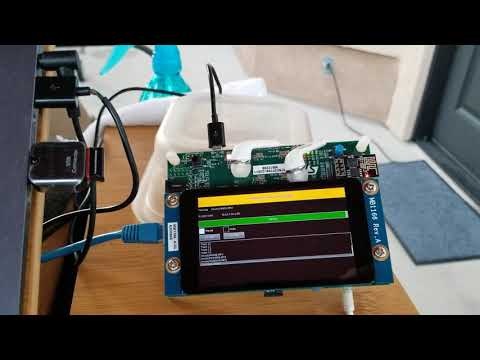
- the 2nd use case demonstrates controlling and monitoring the state of a MP3 Player from a Node-Red's UI Dashboard; and if ESP8266 (WiFi Module) is attached to STM32F769i, it could be controlled as well via RESTful Web Service (web server) hosted on ESP8266. Also a GUI was built to control the player using uGFX library (based on V2.7 with slight modification) with ST32F746 & STM32F769i boards. Click here to view a demo.
- the 3rd use case demonstrates reading MPU6050 accelerometer & gyro values and plotting them onto a Node-Red UI Dashboard.
It should be noted; that all three use case:
- were demonstrated using FATFS (w/ SDIO and SPI), ADC; GPT, 5-Button JoyStick, SSD1306 OLED (via I2C), I2S, SAI in a reusable helper modules; that you can include/exclude as you see fit. See ./source folder for details
- easily any of the use cases could be modified/extended to fit other embedded projects.
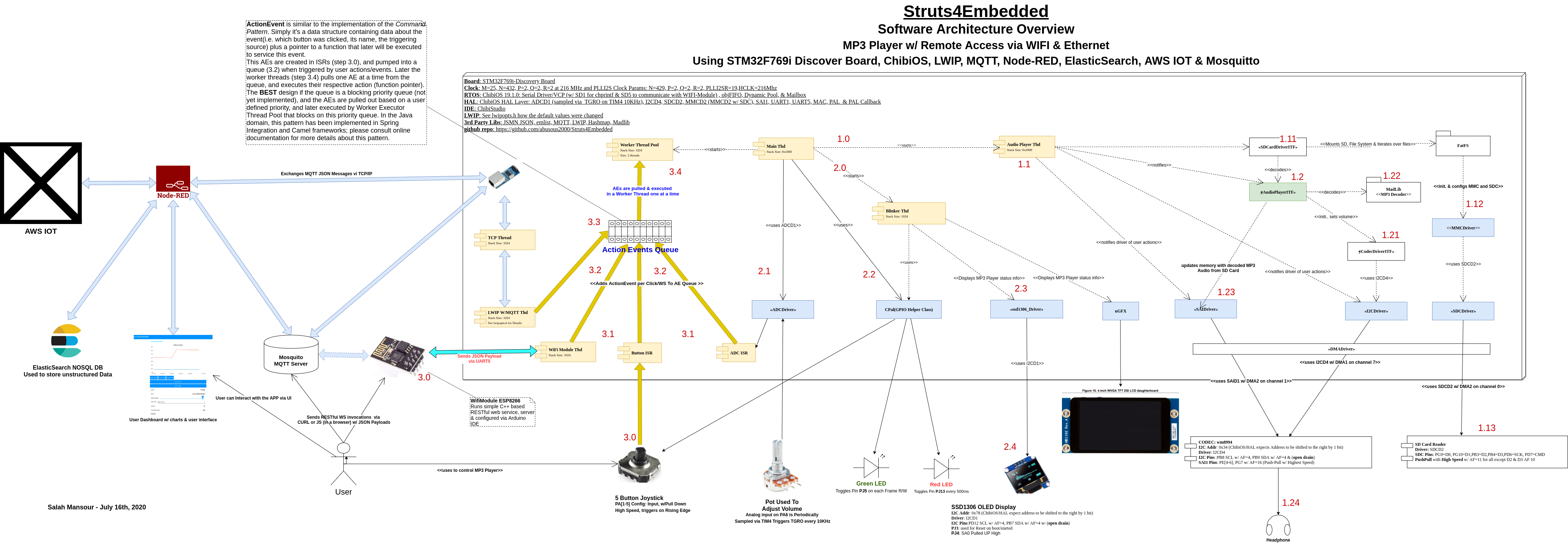
Click here for High Resolution Diagram in PDF
This architectural diagram for the MP3 Player use case with STM32F769i board. Please pay attention to the sequenced steps; and from there you should be able to trace the system & have a good overview.
Struts4Embedded framework is based on actions & events that are statically predefined for each use case (or project). Those actions & events could be triggered/invoked by sending events to a queue (mailbox), and worker thread(s) consume and execute those predefined actions. This is very similar to the command pattern where the senders and the consumers are decoupled. For more details, pay attention in ./source/ActionEvents folder per each project use case. The core of the architecture is very ease to follow in this file ./source/Struts4Embedded/Threads/ActionEventsThd.c which is under 250 lines of code
The framework was tested using the following development boards: STM32F407 Discovery, STM32F407VET6 Blackboard, Seeed Arch Max 1.1, ST32F746 & STM32F769i discovery boards, STM32F446re-Nucleo, STM32F429zi-Nucleo, & STM32F746zg-Nucleo.
- If you don't already have ChibiOS 20.3.x, please download it first. From now on, where you have expanded it, it will be referred to by ChibiOS
- Clone each use case's repository from github into you ChibiOS/demo/STM32 folder, and then import the make projects into ChibiStudio like any other project.
- LWIP zip file is expected to be expanded in ChibiOS/ext folder; same goes for FATFS.
- If you decide to use uGFX, then please clone the modified version of uGFX v2.7 in ChibiOS/ext folder; this version has been modified slightly. Note that recent versions were very hard to integrate with ChibiOS.
- In ChiboOS/ root folder; please clone ChibiOS-Contrib; S4E is dependent on it.
- Everyone of the used development boards has its own configuration & make files. A configuration file per board is located into ./conf/BoardName/Struts4EmbeddedConf.h where you'll find all specific configuration parameters per board (inclusive of all used pins & drivers). And make files are all grouped in /.make folder. Therefore this is a great starting point to understand project dependencies.
- Static IP 10.42.0.10 was chosen running on network 10.42.0.X which you can easily change in ./conf/lwipopts.h
- With boards with Arduino headers, I found that using Waveshare's Accessory Shield to be very helpful. It has SSS1306 LCD, POT, buzzer, RGB light, RTC clock, 5 button joystick, temperature & accelerometer sensors. I suggest buying one (under $18); it made my life very easy.
- For development boards without ethernet modules, I used LAN8720; for some reason I wasn't able to make ChibiOS work with DP83848!
- Make sure that you test Node-Red UI Dashboard as the last step. Therefore, first make sure that your MQTT broker is receiving and sending messages to your application. It should be noted that I tested with Node-Red V1.0.4, since then recent versions were released
- Node-Red Flows can be found in ./node-red folder, and this current deployment is dependent on the following node modules: dashboard, contrib-fs, elasticsearch7, sqlite3, rbe, tail & binance. Therefore please install them before importing the flows.
- Mosquito MQTT Broker was used as the primary MQTT broker; other online MQTT brokers (i.e. Dashboard Broker) were tested and they were just fine. Please inspect ./conf/lwipopts.h for MQTT broker and network parameters.
- See folder ./source/ESP8266WiFiModule for the Arduino sketch that runs the Web Service (web Server) on ESP8266. Please change to your WiFi's SSID & password at the top of the sketch.
- The MP3 Player expects the files to be played to be in folder /music; which you can override in main.c. The audio driver could be found in ./source/AudioDriver.
- If you test with either STM32F407VET6 Blackboard, Seeed Arch Max 1.1 or STM32F407 Discovery boards, then use the relevant board files provided here in ./make/make/backup/ folder; it contain the board files that were used.
- Every project was compiled & tested with C++ & STL Templates as well. However, please note the size of C++ binaries shall increase by at least 300k, and your RAM usage increases as well. The make files, used different links, and if you get a link error, you can copy them from ./make/make/backup/. I recommend copying all ./Struts4Embedded/make/*.ld files to ChibiOS/os/common/startup/ARMCMx/compilers/GCC/ld
Please note that above setup instructions are the defaults defined in make, header and configuration files. They are not written in stone; therefore if you don't like them please be free to change.
Basically Apache 2.0 has been adopted, therefore please be free to use as you see fit and I shall welcome your critical feedback. I hope this framework will help others in speeding up the development process using a tested & well designed framework. Therefore please be free to use and upgrade as you see fit.
Finally, I would like to tell you that prior to 5 to 6 months ago, I had limited exposure to embedded systems or ChibiOS (not even Adruino). However, it was easy for me to pick since I come from a strong architectural background in the Java domain. Frankly, the last time I coded in C/C++ was 20+ years ago! Therefore I'm new to this field, however, ChibiOS really made my job a lot easier. It is a well designed RTOS, and if it wasn't available I was about to do something very similar. The honest truth, it is a well designed, intuitive, very easy to use, well supported & documented, & very easy to reverse engineer.